
I’ve got the opportunity to do some work on a Ruby on Rails web app coming up soon. I’m documenting my journey here of getting up to speed with Ruby coming from Python on MacOS. This post is going to be in the form of questions I had and how I answered them (with the help of google / ChatGPT of course…)
Q1. How to install Ruby? Is there a good package manager like uv for python?
A1. In mid-2025 rv was released which aims to be exactly that – currently is just used for ruby installation rather than for packages. There are other ways but looks like this is a good way to start
brew install rv # install rv
rv ruby run 3.4.7 -- --version # run ruby (rv will install automatically)
echo 'eval "$(rv shell init zsh)"' >> ~/.zshrc # add rv to .zshrc so we can use this ruby rather than the (old) system ruby
Q2. Does Ruby have something like the python REPL to run snippets of code line by line?
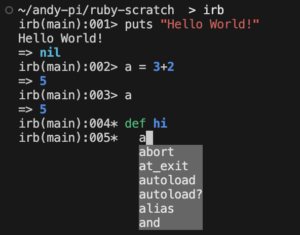
A2. Ruby has irb which means ‘interactive ruby’. This seems a bit more polished than the default python REPL, with syntax highlighting and autocomplete:
Q3. Is there something similar to python’s virtual envs? Or how can I start with a new project?
A3. It seems like there isn’t a direct equivalent to a virtual env for Ruby, but there is bundle (sort of like pip) that can install gems (sort of like packages) into the project folder.
a) Project Setup
mkdir ruby-scratch && cd ruby-scratch # folder setup
rv ruby pin 3.4.7 # creates .ruby-version
bundle init # creates Gemfile for dependencies (like pyproject.toml)
bundle config set --local path vendor/bundle # tell bundle where to install gems
b) Add a gem (like a package)
##Gemfile##
source "https://rubygems.org"
gem "httparty"
bundle install
The above command creates Gemfile.lock and installs the packages in Gemfile to vendor/bundle/ – this folder should not be added to source control (a bit like .env in python)
c) Create and run a script in the project
##main.rb##
require "httparty"
response = HTTParty.get("https://example.com")
puts response.code
To run the script (like uv run):
bundle exec ruby main.rb
Or we can run in irb to see the code step by step:
bundle exec irb main.rb
d) Project Folder View
So a basic project folder in Ruby will look like:
├── .bundle
│   └── config
├── .ruby-version
├── Gemfile
├── Gemfile.lock
└── main.rb
Next Steps
Project setup is complete… next step will be to get familiar with the code syntax!

Leave a Reply